
Download Speechi Light – PowerPoint to Flash, Flash animation, document printer, slide browsing, PPT to PPS conversion, visual narrative, web browser compatibility
Overview
Speechi Light is a specialized utility designed to bridge the gap between traditional PowerPoint presentations and modern web-based accessibility. By converting PPT and PPS files into Flash animations, the application enables users to share dynamic slide decks across different platforms without requiring PowerPoint installed. This functionality is particularly useful for educators, professionals, and content creators who need to distribute presentations through web browsers, ensuring consistent visual delivery regardless of the viewer’s device or software environment.
The app’s core purpose lies in preserving the visual integrity of presentations during conversion. It supports the retention of approximately 200 PowerPoint transitions, a significant feature that maintains the intended pacing and storytelling flow of the original slides. This capability enhances the viewer experience by ensuring that animations and effects are not lost in translation. The tool is especially valuable in educational settings and corporate environments where interactive, visually rich content is essential.
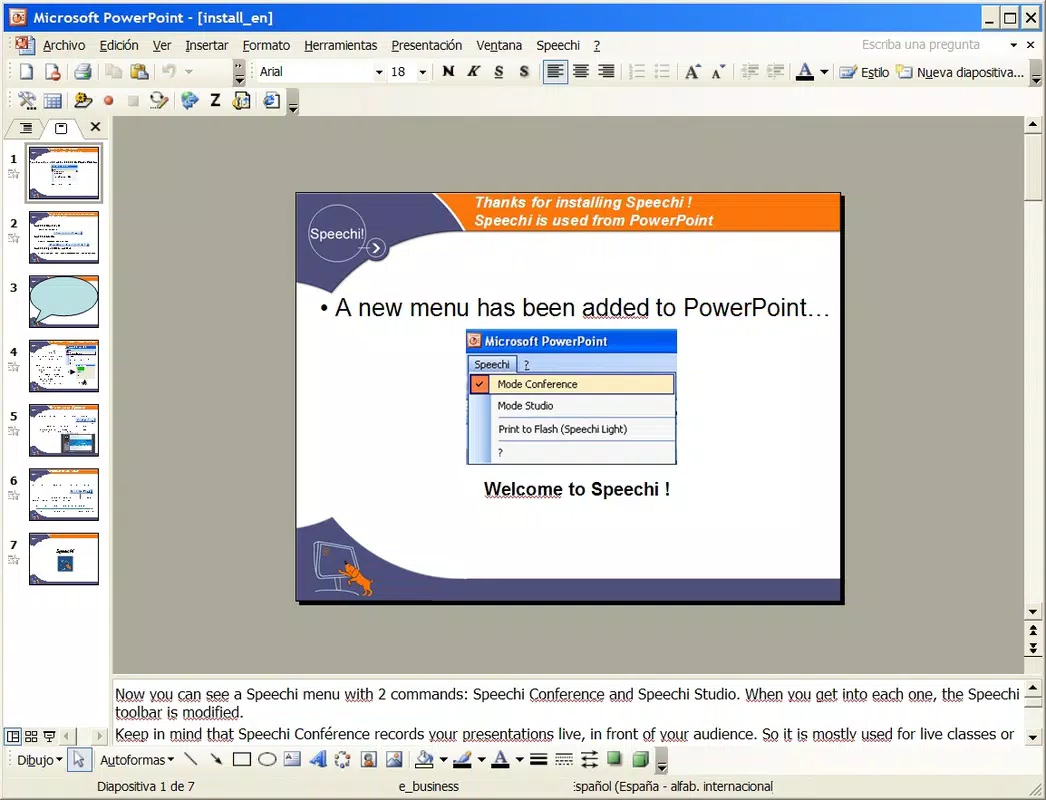
Speechi Light is positioned as a lightweight solution within the productivity category, focusing on document printing and slide browsing directly within PowerPoint. Its integration with the PowerPoint interface simplifies workflow, allowing users to access conversion and printing functions through a dedicated menu. Although the developer did not provide additional technical details about the app’s architecture or target audience demographics, its design suggests a focus on ease of use and compatibility with existing workflows.
Within the broader app ecosystem, Speechi Light fills a niche for users seeking a streamlined method to convert and distribute presentations. Its ability to generate browser-accessible Flash content adds a layer of flexibility that traditional file formats lack. While the tool is not marketed as a full-featured multimedia editor, its targeted functionality makes it a relevant utility for specific use cases involving web sharing and offline viewing of dynamic slide content.
Key Features & Functionality
- PowerPoint to Flash Conversion: The application transforms standard PPT and PPS files into Flash animations, enabling playback in any web browser. This feature allows users to share presentations beyond the confines of PowerPoint, making them accessible to audiences using different operating systems or devices.
- Transition Recognition: Speechi Light preserves up to 200 original PowerPoint transitions during conversion. This ensures that the dynamic effects, such as fades, wipes, and builds, remain intact, maintaining the visual narrative and intended timing of the presentation.
- Document Printer Integration: A built-in document printer function is accessible through the Speechi menu inside PowerPoint. This allows users to print converted presentations directly, streamlining the workflow for physical distribution or archival purposes.
- User-Friendly Slide Browsing Interface: After conversion, the app provides a dedicated interface for navigating through slides. This interface supports smooth, interactive browsing, improving the viewer experience when reviewing content without full PowerPoint access.
- Format Compatibility: The tool supports both PPT and PPS file formats, ensuring broad usability across different types of presentation files. This compatibility enhances flexibility for users working with various project types and legacy files.
These features collectively address common challenges in presentation sharing—format limitations, dependency on specific software, and loss of visual effects. For instance, a teacher preparing a lesson can convert a PPT file into a Flash animation, embed it in a learning management system, and ensure students can view it on any device with a browser. Similarly, a corporate trainer can distribute a dynamic presentation with animated transitions via email or a company portal, ensuring consistency in delivery.
Interface, UX & Performance
Speechi Light integrates directly into the PowerPoint environment, leveraging the host application’s interface for its core operations. This integration ensures a familiar user experience, reducing the learning curve for users accustomed to PowerPoint workflows. The application’s interface is designed to be minimal and functional, with a focus on accessibility through a dedicated menu within PowerPoint.
Navigating through the app’s features is straightforward, with conversion and printing options available via a simple menu selection. The resulting Flash animations are presented through a standalone browsing interface, which allows users to advance through slides with intuitive controls. While the developer did not list formal performance metrics, the app’s lightweight nature—12.8 MB in size—suggests efficient resource usage, likely contributing to smooth operation even on older systems.
Although the developer did not specify minimum OS requirements or performance benchmarks, the application appears optimized for stability within the PowerPoint environment. Users can expect consistent behavior when converting files, with minimal risk of crashes or data corruption. Responsiveness during slide browsing is likely adequate given the app’s focus on playback rather than real-time editing.
Overall, the UX prioritizes simplicity and functionality over visual flair. The app does not attempt to replicate a standalone mobile or desktop application experience but instead functions as a seamless add-on to PowerPoint. This design choice enhances usability for its target audience, who value efficiency and reliability over advanced customization.
Platform Compatibility & Technical Requirements
Speechi Light is designed for the Windows platform and operates within the Microsoft PowerPoint environment. The application is compatible with both PPT and PPS file formats, offering flexibility for users working with different types of presentation files. It requires a Windows-based system with PowerPoint installed to function properly.
The app has a file size of 12.8 MB, indicating a lightweight footprint that should not impose significant storage demands on most devices. This small size suggests minimal system resource consumption during installation and runtime, making it suitable for use on a wide range of Windows machines, including older or low-spec systems.
Although the developer did not specify minimum OS requirements, version details, or hardware recommendations, the application’s compatibility with PowerPoint implies it is designed for desktop environments. Users should ensure that their system supports the version of PowerPoint they are using, as compatibility may vary across different versions of the software.
Given the app’s release date of April 14, 2015, it may not support the latest versions of PowerPoint or Windows. Users should exercise caution when deploying the tool on modern systems, as outdated software may face compatibility issues or security limitations.
Pros and Cons
- Lightweight size (12.8 MB) reduces system impact
- Preserves up to 200 PowerPoint transitions during conversion
- Direct integration with PowerPoint for seamless workflow
- Supports both PPT and PPS file formats
- Enables web browser playback of presentations
- Includes a built-in document printer for direct printing
- Provides a user-friendly interface for slide browsing
- Released in 2015; may lack support for modern PowerPoint versions
- Platform limited to Windows only
- Compatibility with current operating systems not confirmed
- Developer did not provide detailed technical specifications
- No information on update frequency or long-term maintenance
FAQ
Is Speechi Light compatible with the latest version of PowerPoint?
The developer did not specify compatibility with current PowerPoint versions. Users should verify functionality on their specific setup, as the app was released in 2015.
Can I use Speechi Light on macOS or mobile devices?
Speechi Light is designed for Windows only. There is no official support for macOS, iOS, or Android devices.
Does Speechi Light require an internet connection?
No internet connection is required for conversion or playback of Flash animations. The app operates offline once installed.
How do I install Speechi Light?
Download the installer from the official source and run it on a Windows machine with PowerPoint installed. Follow the on-screen instructions to complete the setup.
Is Speechi Light secure to use?
While the app is free and functional, users should ensure they download it from a trusted source. The developer did not provide security details or update history.
Final Thoughts
Speechi Light remains a niche yet functional tool for users seeking to convert PowerPoint presentations into web-accessible Flash animations. Its ability to retain a significant number of transitions and integrate directly into PowerPoint makes it a practical solution for educators, trainers, and presenters who prioritize visual storytelling. The inclusion of a document printer and a dedicated slide browsing interface further enhances its utility within a productivity workflow.
Despite its age and limited platform support, the app delivers on its core promise: transforming static or proprietary presentations into universally viewable content. While modern alternatives may offer more advanced features, Speechi Light’s simplicity and focused functionality still hold value for specific use cases.
For users still relying on PowerPoint and needing a lightweight, free tool for presentation conversion and distribution, Speechi Light offers a viable option. Its compatibility with common file formats and minimal system requirements make it accessible even on older hardware.
Download Speechi Light now


